


Best Website Design Company | Best SEO Company … [Read more...] about Top Web Development Company – Giraffe Web – South Carolina Best in Business 2023
1st Place for South Carolina Best in Business 2022 Web Development Company – Giraffe Web

Fine Reclamation Works gets a facelift

Redesigning Fine Reclamation Works: Crafting a Digital Home for Timeless Materials A great website doesn’t just look beautiful — it feels like an extension of the business it represents. That was my guiding principle when I recently redesigned Fine Reclamation Works, a Greenville, SC–based source for unique, one-of-a-kind reclaimed construction materials, vintage pieces, and … [Read more...] about Fine Reclamation Works gets a facelift
Refreshing ETHDC’s Website to Match a New Logo & Color Identity

Design is never truly done - it evolves as brands grow, audiences shift, and visual identities strengthen. That was the driving insight behind the recent visual refresh of the East Tennessee Housing Development Corporation website (https://ethdc.org/), where we updated the site to reflect a new logo and color scheme. Back in 2013 when the organization started, we used a theme … [Read more...] about Refreshing ETHDC’s Website to Match a New Logo & Color Identity
How to find the info on Bing’s Daily Wallpaper image
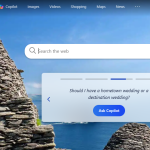
In previous versions of MS Windows, the daily image had a little "i" you could mouse over and see the information on the daily image on you desktop background. With Windows 11, the "i" disappeared and there is not any direct and obvious way to find the info. Searches all reveal that you can click the Bing icon on your tray, and it gives the information. But now clicking the … [Read more...] about How to find the info on Bing’s Daily Wallpaper image
Domain Expired – What to do now? A case study.

Giraffe Web was brought in a year or so ago via an account admin at solopreneur marketing company to help with updating a website, which is entirely in my wheelhouse to work on various website platforms - html, WordPress, Wix, SquareSpace, Duda, etc. We worked with this same client at the beginning of the pandemic on their virtual fundraisers, and their site was in WordPress. … [Read more...] about Domain Expired – What to do now? A case study.
21st Century Fitness – Best Anti-Aging System

A few years ago, and 81-year-old man came to our office wringing his hands. He had developed a series of videos, and several versions of a book for his anti-aging formula. He explained that he was a student of Joseph Pilates' protégé, Romana Kryzanowska. He took pilates classes at the original studio when he lived in New York city. From there, he met with top nutritionists, … [Read more...] about 21st Century Fitness – Best Anti-Aging System